

CLI Reference
The provider-agnostic reference for the Plumber CLI. Only the analyze command takes provider-specific flags and tokens; the config commands, plumber explain, exit codes, and output formats behave identically on GitLab and GitHub. See the Installation page to install the CLI, and the GitHub and GitLab pages for provider specifics.
Configuration
Configuration modes are documented on the Configuration page, and every control’s fields and defaults on the Controls configuration reference. The plumber config commands are documented below.
Command Reference
plumber analyze
The main command for analyzing GitLab CI/CD pipelines and GitHub Actions workflows.
plumber analyze [flags]Flags
| Flag | Required | Default | Description |
|---|---|---|---|
--gitlab-url | No* | auto-detect | GitLab instance URL (e.g., https://gitlab.com). Mutually exclusive with --github-url. |
--github-url | No* | auto-detect | GitHub host (e.g., github.com or ghes.example.com). Mutually exclusive with --gitlab-url. |
--provider | No | auto-detect | Force the provider: github or gitlab (overrides auto-detection; the host is still auto-detected). |
--project | No* | auto-detect | Project / repo path. GitLab: group/project. GitHub: owner/repo. |
--config | No | .plumber.yaml | Path to configuration file |
--min-score | No | - | Minimum Plumber Score letter to pass (A-E), e.g. B fails on C, D, E. The recommended way to gate CI on the score |
--min-points | No | 100 | Fine-grained gate on score points (0-100). The default (100) fails on any finding; not applied when only --min-score is set |
--threshold | No | - | Deprecated. Minimum percentage of passing controls (0-100). Use --min-score / --min-points; cannot be combined with them |
--branch | No | Project default | Branch to analyze |
--print | No | true | Print the human-readable report and, on a terminal, the progress bar. Log verbosity is --verbose; file outputs (--output, --sarif, …) are unaffected |
--output, -o | No | - | Write JSON results to file |
--pbom | No | - | Write PBOM (Pipeline Bill of Materials) to file |
--pbom-cyclonedx | No | - | Write PBOM in CycloneDX SBOM format |
--sarif | No | - | Write SARIF 2.1.0 results to file (for GitHub Code Scanning / GitLab Security Dashboard) |
--glsast | No | - | Write a GitLab SAST report (gl-sast-report.json) for the GitLab Security Dashboard / MR widget |
--csv | No | - | Write results to a CSV file: every control with its status, plus one row per finding for failing controls |
--ocsf | No | - | Write OCSF Compliance Finding results (JSON array, schema 1.8.0) for OCSF consumers and GRC platforms |
--mr-comment | No | false | Post/update a Plumber comment on the merge request (MR pipelines only; requires api scope) |
--badge | No | false | Create/update a Plumber badge on the project (requires api scope; only runs on default branch) |
--score | No | false | Deprecated no-op. The score banner (letter, points, bar, severity counts) and the score in the JSON, PBOM and CycloneDX output are produced by default; the flag is still accepted so existing invocations do not break |
--score-point | No | false | Add the full per-issue-code points breakdown (Code / Severity / Count / Weight / Cap / Loss) to stdout and the MR comment, on top of the default banner |
--score-push | No | false | Publish this repo’s Plumber Score to the hosted badge service. Runs in CI only (needs a CI-native OIDC id-token; a local run is a no-op). Every run that has score push enabled publishes its result for its branch. The public badge and the project’s score follow the default branch only: a merge-request or pull-request run is stored under its branch and never changes the badge. See Plumber Score |
--score-endpoint | No | https://score.getplumber.io | Score service base URL. Override only for a self-hosted score service; the minted OIDC audience follows this value so it always matches the target |
--controls | No | - | Run only listed controls (comma-separated). Cannot be used with --skip-controls |
--skip-controls | No | - | Skip listed controls (comma-separated). Cannot be used with --controls |
--no-controls | No | false | Run no control at all: collect the pipeline, write the requested inventory artifacts, and skip evaluation entirely. Overrides the controls enabled in .plumber.yaml. No score, no gate. Cannot be combined with --controls / --skip-controls. See Artifact-only runs |
--fail-warnings | No | false | Fail on warnings: configuration warnings such as unknown keys (exit 2) and “could not verify” warnings such as a skipped known-CVE check (exit 3) |
--ci-config-path | No | auto-detect | Override CI configuration file path. Defaults to project CI config path from GitLab settings (usually .gitlab-ci.yml) |
--verbose, -v | No | false | Enable debug logging on stderr (level=debug); replaces the progress bar. Independent of --print |
Info
* Auto-detected from git remote (requires origin) if not specified. Supports both SSH and HTTPS remote URLs. * You can always override with --gitlab-url / --github-url and --project
Environment variables
| Variable | Required | Description |
|---|---|---|
GITLAB_TOKEN | GitLab only | GitLab API token with read_api + read_repository scopes (from a Maintainer or higher). Use api scope instead if --mr-comment or --badge is enabled. |
GH_TOKEN / GITHUB_TOKEN | GitHub only | GitHub API token. Fine-grained PAT needs Contents: Read, Metadata: Read, Administration: Read. Classic PAT needs repo. Alternatively, run gh auth login and Plumber will pick up the gh CLI credential. |
PLUMBER_METADATA_TOKEN | No (GitHub) | Token used only to resolve third-party action versions for the known-CVE check (ISSUE-703). Set it when an action is hosted in an org with an IP allow list that blocks the runner’s GITHUB_TOKEN; a public-repository read scope is enough. Takes precedence over GH_TOKEN for that lookup and carries the higher authenticated rate limit. When unset, Plumber falls back to an anonymous read. |
PLUMBER_NO_UPDATE_CHECK | No | Set to any value (e.g., 1) to disable the automatic version check. |
Every plumber analyze flag can also be set through an environment variable following the convention PLUMBER_ANALYZE_<FLAG> with the flag name uppercased and dashes replaced by underscores (for example PLUMBER_ANALYZE_MIN_SCORE=B, PLUMBER_ANALYZE_OUTPUT=report.json). Flags take precedence over environment variables. The exact variable for each flag is shown in plumber analyze --help.
plumber config init
Interactive wizard to create a minimal .plumber.yaml: pick policy areas (container images, pipeline composition, branch protection, variables) and only those controls are written. For each selected area, prompts cover the tunable fields in the schema (lists, booleans, GitLab access levels, required expressions for catalog components and file templates, and so on).
Requires an interactive terminal (TTY). In CI or Docker without a TTY, use plumber config generate instead and edit the file.
Contrast: plumber config generate writes the full default template with comments (or a minimal overlay starter with --overlay); init writes a short file shaped by your answers. Both init and the plain generate produce a full configuration: nothing is inherited from the baseline afterwards.
plumber config init [flags]| Flag | Default | Description |
|---|---|---|
--output, -o | .plumber.yaml | Output file path |
--force, -f | false | Overwrite existing file without asking |
Examples:
plumber config initplumber config init -o configs/plumber.yamlplumber config generate
Writes the official default .plumber.yaml: the full template Plumber ships with, including comments and every control documented inline. Safe for scripts and CI (no prompts). Use plumber config init when you have a TTY and want a smaller file with only the checks you pick.
With --overlay, writes a minimal overlay starter instead: a few commented lines beginning with extends: plumber:default that inherit the whole baseline. This is the recommended starting point.
plumber config generate [flags]| Flag | Default | Description |
|---|---|---|
--output, -o | .plumber.yaml | Output file path |
--force, -f | false | Overwrite existing file |
--overlay | false | Write a minimal overlay starter (extends: plumber:default) instead of the full template |
Examples:
plumber config generate --overlayplumber config generateplumber config generate --output my-plumber.yamlplumber config generate --forceplumber config migrate
Upgrades a .plumber.yaml from schema v1 (top-level controls:) to schema v2 (per-provider gitlab.controls: / github.controls:). Comments and YAML anchors are preserved. The migration is idempotent: running it against a file already on v2 is a no-op with a friendly exit message.
By default the tool writes a sibling .plumber.yaml.v2 so you can diff before swapping. Pass --in-place to overwrite the original; the previous file is backed up to .plumber.yaml.bak.
plumber config migrate [flags]| Flag | Default | Description |
|---|---|---|
--input | .plumber.yaml | Input config path to read |
--output | <input>.v2 | Output path. Ignored when --in-place is set. |
--in-place | false | Overwrite the input file in place. The original is backed up to <input>.bak. |
Examples:
# Write a sibling .plumber.yaml.v2; diff before swapping.plumber config migratediff .plumber.yaml .plumber.yaml.v2mv .plumber.yaml.v2 .plumber.yaml
# Or migrate in place, with backup.plumber config migrate --in-place
Info
Plumber still loads v1 files in the current release; the loader auto-converts them in memory and emits a one-line deprecation warning each run. v1 support will be removed in 1.0.0, so migrating is the safe path before that release.
plumber config view
Display a clean, human-readable view of the effective configuration without comments.
plumber config view [flags]| Flag | Default | Description |
|---|---|---|
--config, -c | .plumber.yaml | Path to configuration file |
--no-color | false | Disable colorized output |
--explain | false | For an overlay config: also print, per control, whether the value is inherited from plumber:default (base) or set in your file (overlay) |
Booleans are colorized for quick scanning: true in green, false in red. Color is automatically disabled when piping output.
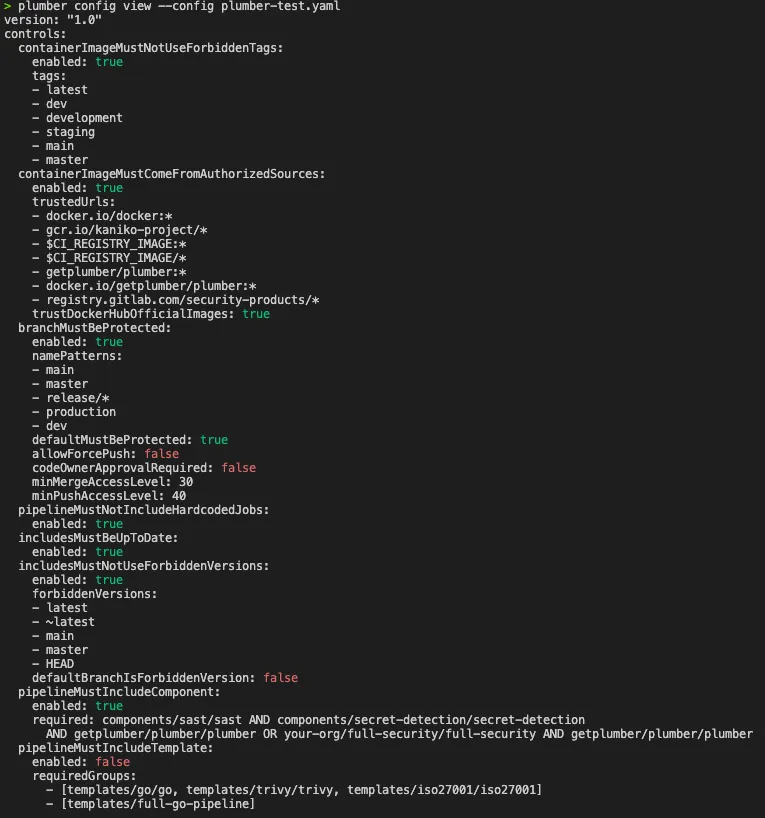
Examples:
# View the default .plumber.yamlplumber config view
# View a specific config fileplumber config view --config custom-plumber.yaml
# View without colors (for piping or scripts)plumber config view --no-color
# Show where each control's value comes from (base vs overlay)plumber config view --explain
plumber config resolve
Resolve extends and includePlumberDefaults and print the complete effective .plumber.yaml. Use it to see exactly what a scan with an overlay config will run, or to materialize an overlay into a full, self-contained file you can commit (nothing left implicit).
With no config file and no --config, it prints the built-in default configuration, i.e. what a zero-config run uses.
plumber config resolve [flags]| Flag | Default | Description |
|---|---|---|
--config, -c | .plumber.yaml | Path to configuration file |
--output, -o | stdout | Write the resolved config to this file |
Examples:
plumber config resolveplumber config resolve -c overlay.yaml -o full.plumber.yamlplumber config slim
The inverse of plumber config resolve: collapse a full .plumber.yaml into a minimal overlay that extends plumber:default, keeping only the values that differ from the baseline. The right migration path for an existing full config you no longer want to maintain line by line.
The result is a fresh minimal file (comments are not preserved) and it is safe by construction: a control your full config disabled or omitted stays disabled, and a trust list you narrowed stays narrowed; slim then resolve never widens trust or re-enables a control. Review the output, then commit it.
plumber config slim [flags]| Flag | Default | Description |
|---|---|---|
--config, -c | .plumber.yaml | Path to the full configuration file |
--output, -o | stdout | Write the slim overlay to this file |
Examples:
plumber config slim -o .plumber.yamlplumber config slim -c old.yaml -o slim.yamlplumber config diff
Display a clean, human-readable view of the differences between the current configuration and the defaults, so you can see exactly what you have changed.
plumber config diff [flags]| Flag | Default | Description |
|---|---|---|
--config, -c | .plumber.yaml | Path to configuration file |
--no-color | false | Disable colorized output |
Examples:
plumber config diffplumber config diff --config custom-plumber.yamlplumber config diff --config custom-plumber.yaml --no-colorplumber config validate
Validate a configuration file for correctness. Detects unknown control names and sub-keys with typo suggestions using fuzzy matching.
plumber config validate [flags]| Flag | Default | Description |
|---|---|---|
--config, -c | .plumber.yaml | Path to configuration file |
--fail-warnings | false | Treat configuration warnings as errors (exit 2) |
Warnings are printed to stderr so they don’t interfere with scripted output. Use --fail-warnings to exit with code 2 when warnings are found (useful in CI).
Examples:
# Validate the default .plumber.yamlplumber config validate
# Validate a specific config fileplumber config validate --config custom-plumber.yaml
# Fail on warnings (for CI pipelines)plumber config validate --fail-warnings
Sample output with typos:
Configuration validation warnings: - Unknown control in .plumber.yaml: "containerImageMustNotUseForbiddenTag". Did you mean "containerImageMustNotUseForbiddenTags"? - Unknown key "tag" in control "containerImageMustNotUseForbiddenTags". Did you mean "tags"? - Unknown key "allowForcePushes" in control "branchMustBeProtected". Did you mean "allowForcePush"?plumber completion
Generate a shell completion script for bash, zsh, fish, or PowerShell:
plumber completion zsh > "${fpath[1]}/_plumber" # zsh exampleRun plumber completion --help for per-shell installation instructions.
plumber version
Print the CLI version:
plumber versionplumber explain
Look up detailed information for an issue code directly from the terminal.
plumber explain [ISSUE-CODE] [flags]ISSUE-CODE supports both full and shorthand forms:
ISSUE-412412
| Flag | Default | Description |
|---|---|---|
--list | false | List all issue codes with short descriptions |
--all | false | Show detailed information for all issue codes |
--json | false | Output in JSON format |
plumber explain ISSUE-412plumber explain 412plumber explain --listplumber explain --allSample output (plumber explain ISSUE-412):
ISSUE-412: Docker-in-Docker service detectedControl:     pipelineMustNotUseDockerInDocker
Description:  A CI/CD job uses a Docker-in-Docker (dind) service. On shared runners  running in privileged mode, this enables container escape, lateral  movement, and access to secrets from other jobs on the same runner.
Remediation:  Replace Docker-in-Docker with a safer alternative such as Kaniko or  Buildah for building container images. These tools do not require  privileged mode and avoid the security risks of running a Docker daemon  inside a CI container.
Documentation: https://getplumber.io/docs/use-plumber/issues/ISSUE-412
Exit Codes
| Code | Meaning |
|---|---|
0 | Passed (the Plumber Score meets the gate), or --no-controls with data collection intact |
1 | Gate failure (score below --min-score / --min-points, or the deprecated --threshold not met) |
2 | Runtime error (config error, network failure, missing token, etc.) |
3 | Data collection was degraded (some controls could not be verified): always exits 3, regardless of the score gate |
3 | --fail-warnings is set and warnings occurred (e.g. an action version that could not be resolved) |
Automatic Version Check
When running locally, Plumber checks GitHub for newer releases on every invocation and prints an upgrade notice if one is available. The check runs asynchronously and has a 3-second timeout, so it never slows down the analysis.
The check is automatically skipped when:
- Running in CI environments (
CIorGITLAB_CIenvironment variables are set) - Using a development build (version is
dev)
To disable it manually:
export PLUMBER_NO_UPDATE_CHECK=1Output formats & artifacts
By default Plumber prints a colorized, human-readable report to your terminal (--print, on by default). Every machine-readable format below is opt-in: pass the matching flag with a destination path. Formats can be combined in a single run, so one scan can emit JSON, a SARIF report, and an SBOM at once.
| Format | Flag | Spec / shape | What it’s for |
|---|---|---|---|
| Terminal report | --print (default true) | Colorized text on stdout | Human-readable summary: per-control results, findings, and the optional score banner (--score / --score-point) |
| JSON report | --output, -o | Plumber JSON (structure below) | Full structured result for scripting and CI gates |
| Native PBOM | --pbom | Plumber Pipeline Bill of Materials (below) | Detailed inventory of pipeline dependencies (images, components, templates, includes) |
| CycloneDX SBOM | --pbom-cyclonedx | CycloneDX 1.5 (JSON) | Standard SBOM for security tooling such as Grype, Trivy, and Dependency-Track |
| SARIF | --sarif | SARIF 2.1.0 | Findings for GitHub Code Scanning and the GitLab Security Dashboard |
| GitLab SAST report | --glsast | GitLab SAST report schema v15.0.4 (gl-sast-report.json) | Findings for the GitLab Security Dashboard and the merge-request security widget |
| CSV | --csv | Every control with its status, plus a row per finding (columns below) | Spreadsheet tools, ad-hoc analysis, per-control history |
| OCSF | --ocsf | OCSF 1.8.0 Compliance Finding (JSON array) | One event per control with an explicit pass/fail/warning/skipped status, for OCSF consumers and GRC platforms |
Outputs that post back to the provider (not files):
| Output | Flag | Notes |
|---|---|---|
| Merge-request comment | --mr-comment | Posts/updates a Plumber comment on the GitLab MR. Requires an api-scope token; MR pipelines only |
| Project badge | --badge | Creates/updates a Plumber badge on the GitLab project. Requires an api-scope token; runs on the default branch only |
| Hosted Plumber Score badge | --score-push | Publishes this repo’s A-E score to the hosted score service. CI only (needs a CI-native OIDC id-token); a local run is a no-op |
Info
The GitHub Action and GitLab CI component write the JSON report, native PBOM, CycloneDX SBOM, and SARIF by default and upload them as build artifacts. See the GitHub and GitLab pages.
Artifact-only runs
Sometimes you want the inventory and nothing else: a PBOM of what your pipeline pulls in, with no compliance verdict attached. --no-controls is that mode.
plumber analyze --pbom-cyclonedx pbom.cdx --no-controls --print=falsePlumber still collects the pipeline (the inventory is the collected data), then skips policy evaluation entirely. It overrides whatever .plumber.yaml enables, so the same configuration keeps working for a normal plumber analyze in another job: no second config file, no edit.
Nothing the run produces claims a verdict. That is the point of the mode, and it is enforced in every output:
| Output | Under --no-controls |
|---|---|
| Terminal | States plainly that no control ran and that there is no Plumber Score, where the grade would normally be |
JSON (--output) | noControls: true, no plumberScore, and every *Result block is status: "skipped" instead of passed |
CSV (--csv), OCSF (--ocsf) | Every control reports skipped (OCSF Skipped), never passed / Pass |
| PBOM, CycloneDX | The collected inventory only: images, includes and upstream versions, with no per-image or per-include compliance flags |
SARIF (--sarif), GitLab SAST (--glsast) | Not written. An empty SARIF is what makes GitHub Code Scanning clear previously-reported alerts, and an empty GitLab SAST report shows a clean Security Dashboard. Writing either from a run that evaluated nothing would dismiss real alerts |
Flags that read or publish a verdict have nothing to act on and are ignored, with a one-line notice naming them: --min-points, --min-score, --threshold, --score, --score-point, --badge, --score-push, --mr-comment, --platform, plus the two security reports above. No badge is created or updated, and no score is published.
Exit codes. The run exits 0 when data collection succeeded. It still fails with exit 3 when it did not: a degraded collection, a .gitlab-ci.yml that was fetched but does not parse, or (on GitLab) no CI configuration at all. In each of those cases the inventory would be empty, and an empty PBOM must not ship as if it were complete.
Info
Like every other analyze flag, --no-controls can also be set through its environment variable, PLUMBER_ANALYZE_NO_CONTROLS=true. That is the way to reach it from the GitHub Action and the GitLab CI component, which do not expose a dedicated input for it.
PBOM & CycloneDX
--pbom writes Plumber’s native, pipeline-specific inventory; --pbom-cyclonedx writes the same inventory as a CycloneDX 1.5 SBOM, compatible with tools like Grype, Trivy, and Dependency-Track. With the GitLab CI component, the CycloneDX file is automatically uploaded as a GitLab CycloneDX report.
Info
CI/CD components and templates do not have CVEs in public vulnerability databases. The PBOM is primarily an inventory tool: it tells you what’s in your pipeline, not whether those items have known vulnerabilities. For image vulnerability scanning, use trivy image or grype directly on the images.
JSON report structure
plumber analyze --output report.json writes a single JSON object. The keys below are stable for scripting; additional keys may be added in minor versions, existing keys will not be renamed or removed.
Top-level keys
| Key | Type | Description |
|---|---|---|
projectPath | string | Path identifying the analyzed project (e.g. group/project on GitLab, owner/repo on GitHub). |
projectId | number | Provider-side project / repo id, when known. |
defaultBranch | string | Default branch reported by the provider. |
analyzeBranch | string | Branch the analysis actually ran against (--branch or the project default). Omitted when it matches defaultBranch. |
headCommitSha | string | Head commit SHA of the analyzed branch, used to build stable source links. Omitted when it can’t be resolved (e.g. local-only runs). |
ciConfigSource | string | Where the CI configuration came from: local (the working tree) or remote (fetched from the provider). |
ciValid | boolean | Whether the CI configuration parsed successfully. |
ciMissing | boolean | True when no CI configuration file was found. |
ciErrors | array | CI configuration parse errors reported by the provider. Omitted when none. |
pipelineOriginMetrics | object | Counts and origins of pipeline jobs (hardcoded, from include, from component). |
pipelineImageMetrics | object | Counts of container images per source / registry. |
minScore | string | Letter gate from --min-score (A–E). Present only when set. |
minPoints | number | Points gate from --min-points (default 100). Omitted when only --min-score gates or the deprecated --threshold is used. |
threshold | number | Deprecated gate from --threshold. Present only when that flag is supplied. |
passed | boolean | True when the active gate is met. |
noControls | boolean | True when the run used --no-controls, so nothing was evaluated. Every *Result block is status: "skipped" and plumberScore is absent. Omitted on a normal run. Key on this to tell “nothing was checked” apart from “everything was checked and is clean”. |
plumberScore | object | Scored summary: profileId (scoring-v3), per-severity counts, rawPoints, finalPoints, score (A-E), criticalMalusApplied, losses and codeLosses. Written on every run; omitted when the score is withheld because no control was evaluated. |
<control>Result | object | One entry per evaluated control (see below). |
partialControls | array | Controls that could not fully evaluate. Empty or omitted on a clean run. |
warnings | array | Non-fatal “could not verify” messages (e.g. a known-CVE check that couldn’t resolve an action version). Gated by --fail-warnings (exit 3). Omitted when none. |
dataCollectionDegraded | boolean | True when a collection or enrichment step failed mid-run, so the analysis ran on incomplete data. A degraded run always exits with code 3, regardless of the score gate, so it never exits 0. Omitted when false. |
degradedReasons | array | Human-readable reasons behind dataCollectionDegraded. Omitted when not degraded. |
plumberConfig | object | Self-describing snapshot of the effective policy: source, effectivePolicy (the parsed config with comments stripped and, for an overlay config, extends fully resolved), and hash (sha256 of the canonical policy). Written on every run. |
Per-control *Result block
Each *Result block has the same baseline shape. Some controls add a few control-specific keys on top.
| Key | Type | Description |
|---|---|---|
controlName | string | The block’s stable .plumber.yaml control name (e.g. actionsMustBePinnedByCommitSha). Together with each issue’s code, one of the two identifiers safe to build an external mapper against. Lives once on the block; every issue inside it belongs to this control. |
status | string | Explicit evaluation verdict: passed (evaluated, no findings), failed (evaluated, findings raised), skipped (never ran: disabled or filtered out), or error (could not be fully evaluated: missing/invalid CI config or degraded data collection; an empty issues list in this state means “could not tell”, not “compliant”). Use this instead of inferring pass from an empty issues array. |
issues | array | Findings raised by the control (see the entry shape below). |
metrics | object | Counts the control collected (jobs scanned, images checked, branches inspected, etc.). |
skipped | boolean | True when the control was disabled in .plumber.yaml, excluded via --skip-controls, or never run because of --no-controls. Kept for backward compatibility; status: "skipped" mirrors it. |
ciValid | boolean | Same as the top-level field, scoped to what this control needed. |
ciMissing | boolean | Same as the top-level field, scoped to what this control needed. |
version | string | Schema version of the control’s output block. |
issues entry
Each entry describes one finding. Beyond the keys below, a rule adds its own structured payload naming what it flagged (uses for an action reference, tag and link for a container image, branchName, variableName, and so on).
| Key | Type | Description |
|---|---|---|
code | string | The ISSUE-XXX code. |
fingerprint | string | Stable identifier for this finding, for tracking it across runs (see below). |
identity | object | The exact field set the fingerprint is derived from, as data (see below): version (the identity recipe version), fields (the ordered key/value pairs), and subjectFromMessage (true when the finding still identifies on its message text). |
job | string | The CI job the finding sits in. Empty when the finding is not about a job: a branch, an include, or a required template / component / action names its subject in the structured payload (branchName, includePath, templatePath, componentPath, requiredAction, …) instead. |
step | string | GitHub only: the workflow step’s name:, when the author gave the step one. Distinguishes two steps in the same job that reference the same action. Omitted for unnamed steps and on GitLab. |
url | string | Clickable link to the affected file and line on the provider, or the local path outside CI. |
docUrl | string | Link to the issue’s documentation page. |
To track a control across runs (history, remediation state, trend dashboards), key on the pair controlName + status: controlName is the check’s stable identity and status its verdict for that run. To track one individual finding within a control, use its fingerprint.
partialControls entry
When non-empty, each entry has the shape shown in the GitHub authentication section: control, reason, affectedBranches (when relevant), remediation. CI gates should fail loud when this array contains anything, even if passed reads true.
Info
Stability: keys documented above are stable across minor versions. New keys may be added without notice. Existing keys will not be renamed or removed without a major-version bump.
CSV columns
plumber analyze --csv results.csv writes one header row followed by every control in the catalog, not just the ones that found something. A control that passed, was skipped, or could not be evaluated gets a single summary row; a control that failed gets one row per finding. Non-failing controls are listed first, then the failing ones with their findings, so the clean posture reads at the top and the problems are grouped at the bottom.
Because every control is present on every run, a clean scan is a full report rather than an empty file, and an empty code column never has to be interpreted as “compliant”.
Column order is fixed and will not change:
| Column | Description |
|---|---|
code | ISSUE-XXX code. Empty on summary rows (passed, skipped, error), since those describe a control rather than a finding |
fingerprint | Stable per-finding identifier (see below). Empty on summary rows |
controlName | Stable .plumber.yaml control name (e.g. actionsMustBePinnedByCommitSha). Always present |
status | The control’s verdict for this run: passed, failed, skipped, or error. Always present. Every row of a failing control carries failed |
severity | critical, high, medium, or low. Empty on summary rows |
message | Finding message on a failed row; the skip or error reason on a skipped / error row; empty on a passed row |
context | The CI job the finding sits in. Empty when the finding is not about a job (a branch, an include, a required template / component / action); those findings name their subject in the JSON report’s structured payload and identity block |
file | Path of the affected file, relative to the repo root. Empty for repo-level findings (e.g. branch protection) |
line | Line number in file. Empty when there’s no file, or the finding isn’t line-scoped |
url | Clickable link to the affected file/line on the provider, or the local path outside CI |
docUrl | Link to the issue’s documentation page |
To build per-control history, group on controlName and read status for each run. To follow one specific finding, use fingerprint.
Codeless findings (none currently exist) are skipped, since they have no stable identifier to report against.
Finding fingerprint
Every finding carries a fingerprint: a short, stable identifier for that one finding, so you can tell across runs whether it is the same problem, a new one, or resolved. controlName answers “how is this check doing”; fingerprint answers “is this particular finding still there”.
The same value appears in every format, so a finding can be correlated between them:
| Format | Where |
|---|---|
| JSON | fingerprint on each issue entry |
| CSV | fingerprint column |
| SARIF | partialFingerprints["plumber/v1"] (the field GitHub Code Scanning uses to track an alert across runs) |
| GitLab SAST | an identifiers[] entry of type plumber-fingerprint |
| OCSF | fingerprint on each unmapped.plumber_findings[] record |
It is derived from what the finding is about rather than how it is worded: the issue code, the file, the job it sits in when there is one, the subject the rule flagged (an action reference, a branch, an image, a variable, an include path), and the workflow step name when there is one. Line numbers are deliberately excluded, so editing unrelated code above a finding does not change its fingerprint.
For the exact recipe, the subject-key priority, and worked examples of each case (a rule with a structured subject, the same action used twice in one job, the message fallback, repository-level findings), see docs/FINGERPRINT.md.
Info
A fingerprint is a tracking identity, not a primary key. Two steps in one job that reference the same action with no name: are indistinguishable and share a fingerprint, and a few rules deliberately exclude volatile inputs (a group index, a version ref) so that one unresolved problem does not re-key on every edit. Group by it; do not assume one row per value.
The identity block
The fingerprint is a hash, so it cannot tell a consumer which fields it was built from. Each issue entry in the JSON report therefore also carries an identity block: the selected field set itself, as data.
Every identity carries code, file, and job, then exactly one subject key naming what the rule flagged, and finally step when the workflow resolved one. Only the single most specific subject key appears, not every field in the finding’s payload: the recipe walks a fixed priority list and takes the first key the finding carries.
"identity": { "version": 2, "subjectFromMessage": false, "fields": [ { "key": "code", "value": "ISSUE-701" }, { "key": "file", "value": ".github/workflows/build.yaml" }, { "key": "job", "value": "build/compile" }, { "key": "uses", "value": "some-org/some-action@master" }, { "key": "step", "value": "Build image" } ]}| Key | Type | Description |
|---|---|---|
version | number | The identity recipe version (currently 2). It tracks identity outcomes, not just the algorithm: it is bumped whenever fingerprints can move, so a consumer holding stored fingerprints knows when to expect re-keys. |
subjectFromMessage | boolean | True when the rule has no structured subject and the finding identifies on its message text, meaning a wording change in a future release would re-key it. False for the vast majority of findings. |
fields | array | The ordered key/value pairs the fingerprint is derived from. Always code, file, and job; then the one winning subject key; then step when present (see below). |
The fields, in order:
| Field | Always present | Description |
|---|---|---|
code | yes | The ISSUE-XXX code. |
file | yes | Affected file, relative to the repo root. Empty for repo-level findings (e.g. branch protection). |
job | yes | The CI job the finding sits in: <workflow-file>/<job-id> on GitHub, the job name on GitLab. Empty for findings that are not about a job (a branch, an include, or a required template / component / action), which name their subject in the key below instead. |
| (subject) | yes | Exactly one key naming what the rule flagged, chosen as the first present from this priority order: uses, branchName, includePath, templatePath, componentPath, requiredAction, image, serviceImage, link, tag, variableName, hardcodedJob, scriptLine, detail. When the rule carries none of them the subject key is message and subjectFromMessage is true. |
step | no | GitHub only: the workflow step’s name:, when the author gave the step one. Present only when the workflow resolved a step; it is the last discriminator between two steps of one job that reference the same action. |
Everything else in a finding’s payload is deliberately not part of identity: line and url move whenever unrelated code above the finding is edited, advisories grows as CVEs are published, latestVersion moves on any upstream release, and status fields track current settings rather than identity. Any of those in the field set would make an unchanged finding look new.
A platform ingesting Plumber reports should store the identity fields the CLI selected instead of re-deriving them, so the two sides can never disagree about which findings are the same finding. Go consumers can use the public finding/identity package (identity.Of, identity.Fingerprint, identity.FromMap) to work with the same recipe programmatically.