

GitHub
Plumber scans your GitHub Actions workflows and repository configuration for security problems:
- Unpinned actions
- Untrusted input in shell scripts
- Missing branch protection
- More…
It turns them into a Plumber Score from A to E that can block CI below a minimum score you set.
Quick Start
Two ways to scan a GitHub repository:
Run locally
Run with GitHub Actions
Run locally
Install Plumber: Homebrew, mise, a prebuilt binary, Docker, or from source (see Installation).
Authenticate: run
gh auth login, or set aGH_TOKENwith read access to the repo (see Authentication).Run the scan from inside your checked-out repo, or against a remote one (see Running a scan):
Terminal window plumber analyzeRead your Plumber score: an A–E grade with a per-control breakdown, plus an optional JSON report, PBOM, and CycloneDX SBOM (see Example Output).
Run with GitHub Actions
Add the action to your workflow (e.g.
.github/workflows/plumber.yml):Tip
- Pin by commit SHA, not a tag. The snippet below is already pinned to the latest release SHA; see the GitHub Action section of the README for the general shape.
- Permissions. The job needs
security-events: writefor SARIF upload to Code Scanning; without it that step is skipped. Addid-token: writeto publish a live score badge. - Publish a live score badge. Set
score-push: trueto publish a public Plumber Score badge for this repo. See Plumber Score.
name: Plumberon:push:branches: [main]pull_request:permissions:contents: readsecurity-events: write# id-token: write # uncomment to publish a live Plumber Score badge (see below)jobs:plumber:runs-on: ubuntu-24.04steps:- uses: actions/checkout@v6- uses: getplumber/plumber@fb943e4efba61cf7b0a0c56f6648710a7453519b # pinned plumber version: v0.5.20with:score-push: false # set to "true" to publish a public Plumber Score badgePush and check results: findings appear in the Code Scanning tab, the job summary, and the downloadable artifact bundle.
Optionally tune the policy with a
.plumber.yamlWithout one, the action runs Plumber’s built-in default policy, so you can stop here. To tune the policy, the recommended way is a small overlay that extends Plumber’s baseline and lists only what you change:
Terminal window plumber config generate --overlayextends: plumber:defaultversion: "2.0"github:controls:actionsMustBePinnedByCommitSha:trustedOwners:- myorgplumber config generate(without--overlay) writes the full self-contained template instead. See the three configuration modes in the CLI Configuration guide.
Customizing the action
Override any input to fit your needs:
- uses: getplumber/plumber@fb943e4efba61cf7b0a0c56f6648710a7453519b # pinned plumber version: v0.5.20 with: min-score: "B" config-file: configs/strict.plumber.yaml controls: actionsMustBePinnedByCommitSha,branchMustBeProtected score: "true" soft-fail: "true" upload-sarif: "true" upload-artifacts: "true"All inputs
| Input | Default | Description |
|---|---|---|
version | v0.5.3 | Plumber release tag to install. Downloaded from GitHub Releases and verified against checksums.txt and the SLSA attestation |
verify-attestation | true | Verify the binary’s SLSA build-provenance attestation via gh attestation verify. Disable for air-gapped or GHES setups |
github-token | ${{ github.token }} | Token for the GitHub API and SARIF upload. Needs Administration:read for full branchMustBeProtected, and security-events:write for SARIF |
metadata-token | - | Optional token (public-repo read) used only to resolve third-party action versions for the known-CVE check, when an action is hosted in an org with an IP allow list that blocks the runner’s GITHUB_TOKEN. Falls back to an anonymous read when unset |
project | (current repo) | owner/repo to scan remotely (upstream-fetch, no checkout needed) |
github-url | (github.com) | GitHub Enterprise Server host (e.g. ghes.example.com) |
min-score | - | Minimum Plumber Score letter to pass (A-E), e.g. B fails on C, D, E. The recommended way to gate CI on the score |
min-points | "" | Fine-grained gate on score points (0-100). The default (100) fails on any finding; not applied when only min-score is set. Empty means the CLI default gate of 100 points |
threshold | - | Deprecated. Minimum percentage of passing controls (0-100). Use min-score / min-points instead |
config-file | (auto-detect) | Path to a .plumber.yaml. Default: the repo’s .plumber.yaml if present, otherwise the built-in default config (zero-config runs work out of the box) |
controls | - | Run only these controls (comma-separated). Mutually exclusive with skip-controls |
skip-controls | - | Skip these controls (comma-separated). Mutually exclusive with controls |
score | false | Add the full per-issue-code points breakdown on top of the score banner. Off by default; set true to include it |
score-push | false | Publish this repo’s Plumber Score to the hosted badge service (score.getplumber.io) via CI-native OIDC (no secret). The workflow MUST grant permissions: id-token: write. Every run that has score push enabled publishes its result for its branch. The public badge and the project’s score follow the default branch only: a merge-request or pull-request run is stored under its branch and never changes the badge. Warns (never fails) on error. See Plumber Score |
score-endpoint | https://score.getplumber.io | Score service base URL. Override only for a self-hosted score service; the OIDC audience follows this value so it always matches the target |
platform | - | Plumber Platform base URL. Setting it pushes this run’s full results there over CI-native OIDC, and takes precedence over score-push. The workflow MUST grant permissions: id-token: write |
platform-allow-http | false | Allow platform to be plain http for a non-loopback host. Without it, http to anything but localhost / 127.0.0.0/8 / ::1 is refused before any credential is sent; https and loopback http need no opt-in |
fail-warnings | false | Fail on warnings: unknown configuration keys (exit 2) and “could not verify” checks such as a skipped known-CVE lookup (exit 3). soft-fail does not mask exit 3 |
soft-fail | false | Do not fail the job when the score is below the gate. Findings are still produced and uploaded |
upload-sarif | true | Upload the SARIF report to GitHub Code Scanning |
upload-artifacts | true | Upload JSON report, PBOM, and CycloneDX SBOM as a workflow artifact |
artifact-name | plumber-report | Name of the uploaded artifact bundle |
output | plumber-report.json | JSON report output path. Empty to skip |
pbom | plumber-pbom.json | PBOM output path. Empty to skip |
pbom-cyclonedx | plumber-cyclonedx-sbom.json | CycloneDX SBOM output path. Empty to skip |
sarif | plumber.sarif | SARIF 2.1.0 output path. Empty to skip |
Outputs
| Output | Description |
|---|---|
passed | true when the run met its gate (min-score / min-points, or the deprecated threshold) |
report | Path to the JSON report |
sarif | Path to the SARIF report |
Use outputs in downstream steps:
- uses: getplumber/plumber@fb943e4efba61cf7b0a0c56f6648710a7453519b # pinned plumber version: v0.5.20 id: plumber- run: echo "Plumber check passed: ${{ steps.plumber.outputs.passed }}"Code Scanning integration
When upload-sarif is true (the default), the action uploads a SARIF 2.1.0 report to GitHub Code Scanning. Each Plumber finding becomes an alert in the Security tab with:
- The issue code as the rule ID (e.g.
ISSUE-701) - Severity mapped to SARIF level (
error,warning,note) and a numericsecurity-severityfor triage - File location pointing at the workflow YAML line
- A
helpUrilinking to the issue’s documentation page on getplumber.io
Info
Code Scanning requires GitHub Advanced Security on private repos. On public repos it is free.
GitHub Enterprise Server
For GHES, pass the host via github-url:
- uses: getplumber/plumber@fb943e4efba61cf7b0a0c56f6648710a7453519b # pinned plumber version: v0.5.20 with: github-url: ghes.example.com verify-attestation: "false"Set verify-attestation: "false" if the runner cannot reach the sigstore transparency log or your GHES instance does not support gh attestation verify.
Action examples
Scan a remote repo without cloning:
- uses: getplumber/plumber@fb943e4efba61cf7b0a0c56f6648710a7453519b # pinned plumber version: v0.5.20 with: project: my-org/other-repo github-token: ${{ secrets.PLUMBER_PAT }}Run only SHA-pinning and permissions checks:
- uses: getplumber/plumber@fb943e4efba61cf7b0a0c56f6648710a7453519b # pinned plumber version: v0.5.20 with: controls: actionsMustBePinnedByCommitSha,workflowsMustDeclarePermissionsSoft-fail in PRs, hard-fail on main:
- uses: getplumber/plumber@fb943e4efba61cf7b0a0c56f6648710a7453519b # pinned plumber version: v0.5.20 with: soft-fail: ${{ github.event_name == 'pull_request' && 'true' || 'false' }}Authentication
Pick whichever auth flow fits your environment:
# Option 1: GitHub CLI (recommended for local use)gh auth login
# Option 2: Fine-grained Personal Access Token# Settings > Developer settings > Personal access tokens > Fine-grained tokens#   Repository access: pick the repo(s) to scan#   Permissions: Contents = Read, Metadata = Read, Administration = Readexport GH_TOKEN=github_pat_xxxx
# Option 3: Classic PAT (broader scope, still works)# Permissions: `repo` scope (read access to repo + admin metadata)export GH_TOKEN=ghp_xxxx
If a workflow uses an action hosted in an org with an IP allow list, a runner’s GITHUB_TOKEN is blocked when Plumber resolves that action’s version for the known-CVE check; Plumber falls back to an anonymous read, and skips the check rather than guessing if that is rate-limited too. To resolve those versions reliably, set PLUMBER_METADATA_TOKEN (or the action’s metadata-token input) to a token with public-repository read.
Caution
Administration: Read (fine-grained) or repo scope (classic) is needed for the branchMustBeProtected rule to evaluate force-push and code-owner-approval settings. Without it the rule abstains and Plumber reports the abstention explicitly in partialControls rather than claiming a false 100% pass.
Info
branchMustBeProtected reads both classic Branch Protection (Settings > Branches) and Repository / Organization Rulesets (Settings > Rules > Rulesets). Rules from either mechanism are unioned, stricter wins. A code-owner-approval rule defined only in a Ruleset is honored.
When a token-scoped control cannot fully evaluate, Plumber adds a partialControls entry to report.json so CI gates can tell the difference between “100% compliant” and “100% on what we could see”:
"partialControls": [ { "control": "branchMustBeProtected", "reason": "Token lacks Administration:Read scope; force-push and code-owner-approval rules (ISSUE-505) not evaluated.", "affectedBranches": 1, "remediation": "Re-run with a token carrying Administration:Read (fine-grained PAT) or `repo` scope (classic PAT)." }]A non-empty array means at least one control abstained on part of its input: treat the run as suspect rather than trusting the reported percentage. On a clean run the array is omitted or empty.
Running a scan
# Local clone (auto-detected from git remote)plumber analyze
# Upstream-fetch: scan a repo without cloning itplumber analyze --github-url github.com --project myorg/myrepo
On GitHub Enterprise Server, pass the GHES host via --github-url ghes.example.com. Plumber auto-detects github.com from your git remote.
Examples
Selective Control Execution
Run or skip specific controls by their YAML key names from .plumber.yaml, for iterative debugging or targeted CI checks.
# Only check SHA pinning and declared permissionsplumber analyze --controls actionsMustBePinnedByCommitSha,workflowsMustDeclarePermissions
# Run everything except the advisory-database checkplumber analyze --skip-controls actionsMustNotCarryKnownCVEs
Controls not selected are reported as skipped in the output. The --controls and --skip-controls flags are mutually exclusive.
Caution
--controls narrows the controls enabled in .plumber.yaml; it does not enable a disabled one. Naming only controls that are disabled in your configuration leaves zero controls to run, and a run that evaluates nothing fails the gate (exit 1). Check what is enabled with plumber config view.
Inventory Only, No Compliance Verdict
To collect the pipeline inventory without evaluating any control, use --no-controls:
plumber analyze --pbom-cyclonedx pbom.cdx --no-controls --print=falseIt overrides whatever .plumber.yaml enables, exits 0 as long as data collection succeeded, computes no score, and reports every control as skipped rather than passed in the JSON, CSV and OCSF outputs. --sarif and --glsast are deliberately not written: an empty security report clears previously-reported alerts. See Artifact-only runs.
Info
The GitHub Action has no no-controls input yet. Set PLUMBER_ANALYZE_NO_CONTROLS: "true" in the job or step env: to reach the same behaviour through the Action.
Silent Mode (JSON Only)
plumber analyze \ --github-url github.com \ --project myorg/myrepo \ --config .plumber.yaml \ --output results.json \ --print=falseExample Output
The CLI output is color-coded in your terminal for easy scanning: green for passing controls, red for failures.
Tip
When using --output, results are saved as JSON for programmatic access and CI/CD integration.
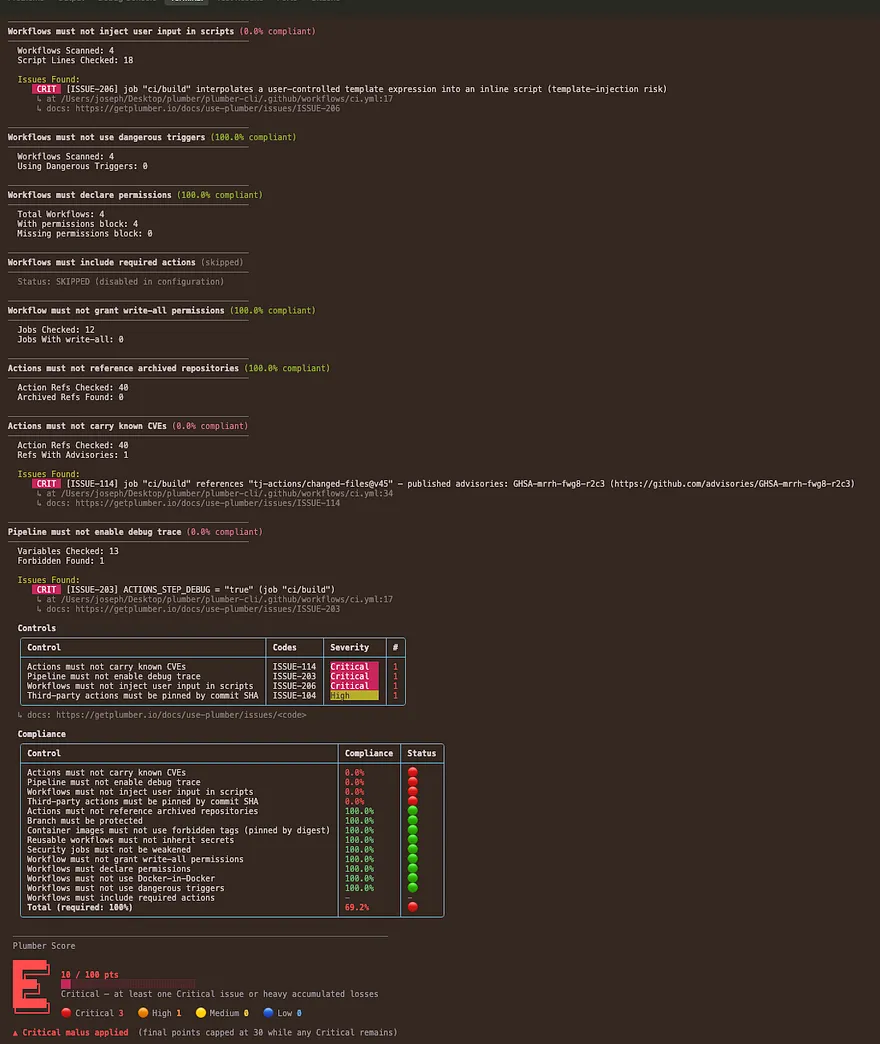
Example Configuration
The github.controls: section of a schema v2 .plumber.yaml. With extends: plumber:default on top, this file is an overlay: every control keeps its baseline setting and you list only what you change. Without extends, the file is the complete policy and a control left out does not run.
extends: plumber:defaultversion: "2.0"
github:  controls:    # Third-party action references must be pinned by 40-character commit SHA.    # trustedOwners is the exemption list; first-party `actions/*` and    # `github/*` are exempt by default.    actionsMustBePinnedByCommitSha:      enabled: true      trustedOwners:        - actions        - github
    # uses: owner/repo@ref pointing at an archived GitHub repository.    actionsMustNotBeArchived:      enabled: true
    # uses: owner/repo@<sha> pinned to a commit the upstream repo confirms    # does not exist (a typo or impostor commit). Abstains on any SHA it    # cannot verify (private repo, rate limit, network).    actionRefsMustExistUpstream:      enabled: true
    # Cross-references every pinned action against the GitHub Advisory    # Database under the `actions` ecosystem.    actionsMustNotCarryKnownCVEs:      enabled: true
    # Reads each third-party action's OWN source: flags an action that    # fetches a script from a moving ref (a branch, not a tag/SHA) and runs    # it with no checksum - a SHA pin on the action cannot reach that code.    # anchore/scan-action → grype's install.sh from `main` is the canonical    # case. Obfuscated decode-then-run is graded critical; an unfetchable    # source is surfaced as could-not-verify, never a silent pass.    actionsMustNotExecuteMutableRemoteCode:      enabled: true
    # Release/publish job that restores a build cache whose key is not    # scoped to the release ref. Actions caches are shared across branches,    # so a PR-populated cache (key or restore-keys prefix) can be injected    # into the published output. Weave github.ref_name / github.sha into the    # key, or disable caching on publish paths.    #    # Fully data-driven: the action/script inventory AND the per-action    # cache semantics live here, not in code.    releaseWorkflowsMustNotRestoreUntrustedCache:      enabled: true      # Actions that mark a job as a release (so its cache restore matters).      publishActions:        - JS-DevTools/npm-publish        - pypa/gh-action-pypi-publish        # - my-org/release-action      # Publish commands in run: scripts that also mark release intent.      publishScriptPatterns:        - '(?i)(npm|pnpm|yarn)\s+publish'        - '(?i)cargo\s+publish'      # Which actions restore a cache, and when. mode:      #   always  - restores whenever present      #   default - restores unless disableInput holds disableValue      #   opt-in  - restores only when enableInput names a package manager      cacheActions:        - {action: actions/cache, mode: always}        - {action: Swatinem/rust-cache, mode: always}        - {action: actions/setup-go, mode: default, disableInput: cache, disableValue: false}        - {action: gradle/actions/setup-gradle, mode: default, disableInput: cache-disabled, disableValue: true}        - {action: actions/setup-node, mode: opt-in, enableInput: cache}      # Jobs to exempt (glob over <workflow-file>/<job-id>) - the escape      # hatch for release jobs you have reviewed and accept.      allowedJobs: []        # - '*/lint'
    # Restrict step and reusable-workflow `uses:` to authorized sources.    # Trust = official owners (actions/*, github/*), your own org    # (trustSameOrgActions), the allowlist below (exact owner/repo or    # owner/* wildcard), or a minimum-stars floor.    githubActionMustComeFromAuthorizedSources:      enabled: true      trustGithubOfficialActions: true      trustSameOrgActions: true      minimumStars: 0      trustedGithubActions:        - jdx/mise-action        # - mycompany/*    # uses: owner/repo@ref where the same name exists upstream as BOTH a    # tag and a branch (ref-confusion). Pin by commit SHA to disambiguate.    externalRefsMustNotCollide:      enabled: true
    # Same forbidden-tag list as GitLab plus a digest-pinning sub-option.    containerImageMustNotUseForbiddenTags:      enabled: true      tags:        - latest        - dev        - development        - staging        - main        - master      containerImagesMustBePinnedByDigest: true
    # Truthy ACTIONS_STEP_DEBUG / ACTIONS_RUNNER_DEBUG in any merged env    # block, expression binding, or runtime $GITHUB_ENV write.    pipelineMustNotEnableDebugTrace:      enabled: true      forbiddenVariables:        - ACTIONS_STEP_DEBUG        - ACTIONS_RUNNER_DEBUG
    # Docker-in-Docker services + insecure daemon configuration    # (DOCKER_TLS_CERTDIR="" or DOCKER_HOST tcp://...:2375).    pipelineMustNotUseDockerInDocker:      enabled: true      detectInsecureDaemon: true
    # `jobs.<name>.secrets: inherit` hands every secret visible to the    # caller (repo, organisation, environment) to the reusable workflow.    # Declare each secret explicitly instead.    reusableWorkflowsMustNotInheritSecrets:      enabled: true
    # `toJson(secrets)` / `toJSON(secrets)` piped into a run script, env    # binding, or action `with:` input. The JSON blob carries every secret    # the job can see; log redaction does not cover it. Name secrets instead.    workflowMustNotExportEntireSecretsContext:      enabled: true
    # On GitHub a job's name is `<workflow-file-basename>/<job-id>`    # (e.g. `codeql-analysis/analyze`). Patterns are globs over that name.    securityJobsMustNotBeWeakened:      enabled: true      securityJobPatterns:        - "*codeql*"        - "*dependency-review*"        - "*trufflehog*"        - "*gitleaks*"        - "*osv-scanner*"        - "*-sast"        - "*-sast-*"        - "*-scan"        - "*scan*"        - "*-security"        - "*-security-*"        - "*-audit"        - "*-audit-*"      allowFailureMustBeFalse:        enabled: true      rulesMustNotBeRedefined:        enabled: true      whenMustNotBeManual:        enabled: true
    # curl | bash, wget | sh, download-then-execute, base64 pipe-to-shell.    pipelineMustNotExecuteUnverifiedScripts:      enabled: true      trustedUrls: []        # - https://internal-artifacts.example.com/*
    # Attacker-controlled free text (`${{ github.event.* }}` titles, bodies,    # branch names, commit messages, or `${{ github.head_ref }}`)    # interpolated directly into a `run:` shell. Bind through env: first.    workflowMustNotInjectUserInputInScripts:      enabled: true
    # `${{ github.event.* }}` / `${{ github.head_ref }}` written into    # $GITHUB_ENV or $GITHUB_PATH is sticky and hijacks every later step.    # env: binding stops ISSUE-207 but not this. Base64-encode the value    # itself (or use toJSON) so a newline can't open a second variable.    workflowMustNotWriteUntrustedContentToGitHubEnv:      enabled: true
    # Secret-bearing triggers an unprivileged caller can fire    # (workflow_run, issue_comment, reviews, discussions, gollum, fork)    # plus a fork-controlled checkout and no same-repo or trusted-author    # guard: a direct exfiltration path (CVE-2025-30066). The    # pull_request_target case is owned by ISSUE-804.    workflowMustNotUseDangerousTriggers:      enabled: true
    # pull_request_target plus an explicit checkout of the PR head runs    # fork code with base-repo secrets (the tj-actions / CVE-2025-30066    # vector). A same-repository job guard is exempt.    pullRequestTargetMustNotCheckoutHead:      enabled: true
    # Jobs with no `permissions:` block at either the job or workflow    # level fall back to the repo-wide GITHUB_TOKEN default. Declare    # `permissions: { contents: read }` at the workflow level for least    # privilege.    workflowsMustDeclarePermissions:      enabled: true
    # `permissions: write-all` at workflow or job scope.    workflowMustNotGrantPermissionsWriteAll:      enabled: true
    # Opt-in. Assert every workflow includes the action(s) your org requires.    workflowMustIncludeRequiredActions:      enabled: false      # requiredGroups:      #   - ["actions/attest-build-provenance"]      #   - ["your-org/license-scan", "your-org/sbom"]
    # Reads both classic Branch Protection and Repository / Organization    # Rulesets, unions them, stricter wins.    branchMustBeProtected:      enabled: true      defaultMustBeProtected: true      namePatterns:        - main        - master        - release/*        - production        - dev      allowForcePush: false      codeOwnerApprovalRequired: true
See the Controls configuration reference for every field and default of every control, the configuration modes (no config, extended, full) and provider-agnostic commands and output formats in the CLI Reference, and the Installation page.
Reference
The complete, always-current catalogs and command reference:
CLI Reference
analyze flag, the config commands, exit codes, and the JSON / PBOM / CycloneDX output.Controls
Issues
ISSUE-XXX with severity, impact, and remediation.Troubleshooting
| Issue | Solution |
|---|---|
no GitHub token found (upstream-fetch mode) | Run gh auth login, or set GH_TOKEN / GITHUB_TOKEN. Upstream-fetch refuses to start without a token because the anonymous tier is rate-limited |
401 Unauthorized | Token is invalid or expired. Fine-grained PAT needs Contents: Read + Metadata: Read; classic PAT needs repo |
branchMustBeProtected shows in partialControls | Token lacks Administration: Read (fine-grained) or repo (classic). The rule abstains rather than claim a false pass |
403 / rate-limit errors | Anonymous or under-scoped token. Authenticate with a PAT or gh auth login |
| ISSUE-703 fires in CI but not locally, or “could not verify” an action’s version | The action’s org enforces an IP allow list that blocks the runner’s GITHUB_TOKEN. Set metadata-token (action) or PLUMBER_METADATA_TOKEN (CLI) to a public-repo-read token |
404 Not Found | Verify --project owner/repo and, for GHES, that --github-url points at the right host |
| Branch protection rule not detected | Plumber reads classic Branch Protection AND Rulesets; confirm the rule is enabled (not in evaluate mode) on a branch matching your namePatterns |
| Configuration file not found | Ensure --config points at the real file (use an absolute path in Docker). Create one with plumber config generate or plumber config init |
| Configuration warnings | Run plumber config validate to list unknown keys and invalid values |
| No repo-level findings on a local scan | Without a token a local scan checks workflow contents only. Run gh auth login or set GH_TOKEN to add branch protection and action-metadata checks |
| Need details on a finding | Run plumber explain ISSUE-XXX for its description and remediation |
| SARIF upload fails with 403 | The job needs security-events: write permission. Add it under the workflow or job-level permissions: block |
| Attestation verification fails | The runner cannot reach sigstore or gh CLI is not installed. Set verify-attestation: "false" to skip |
| Score badge not published | score-push needs permissions: id-token: write in the workflow. The public badge only reflects your default branch; pull request runs can’t publish (their OIDC token has no branch ref), so the badge updates when the PR merges. A local run never publishes. The push warns, never fails, when the token or permission is missing. See Plumber Score |