

News
Poisoned litellm in your CI
litellm 1.107.0 shipped files that are not in its git tag. PyPI quarantined it the same day. How to check your pipelines and what to rotate.
By Plumber
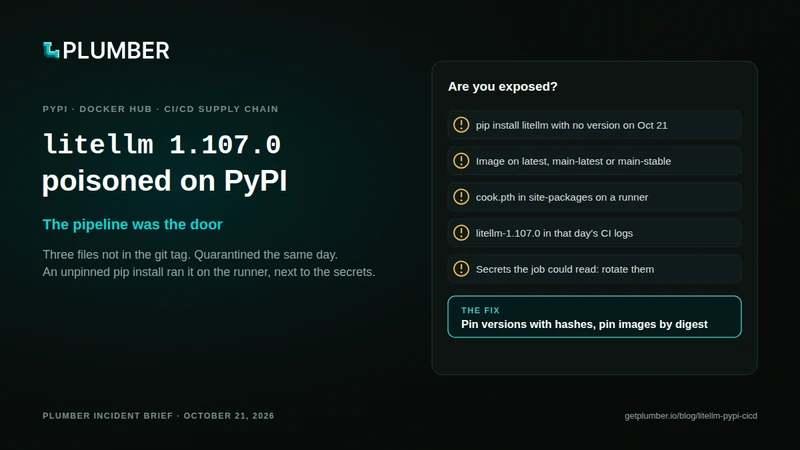
On October 21, 2026, litellm 1.107.0 went up on PyPI with three files that are not in the project’s git tag. PyPI quarantined the release the same day.
litellm had 22.7 million PyPI downloads the week before, and many of them come from CI jobs that run pip install litellm with no version. If one of your pipelines did that on October 21, the pipeline was the door: the payload ran on the runner, next to that job’s secrets.
What happened
The release
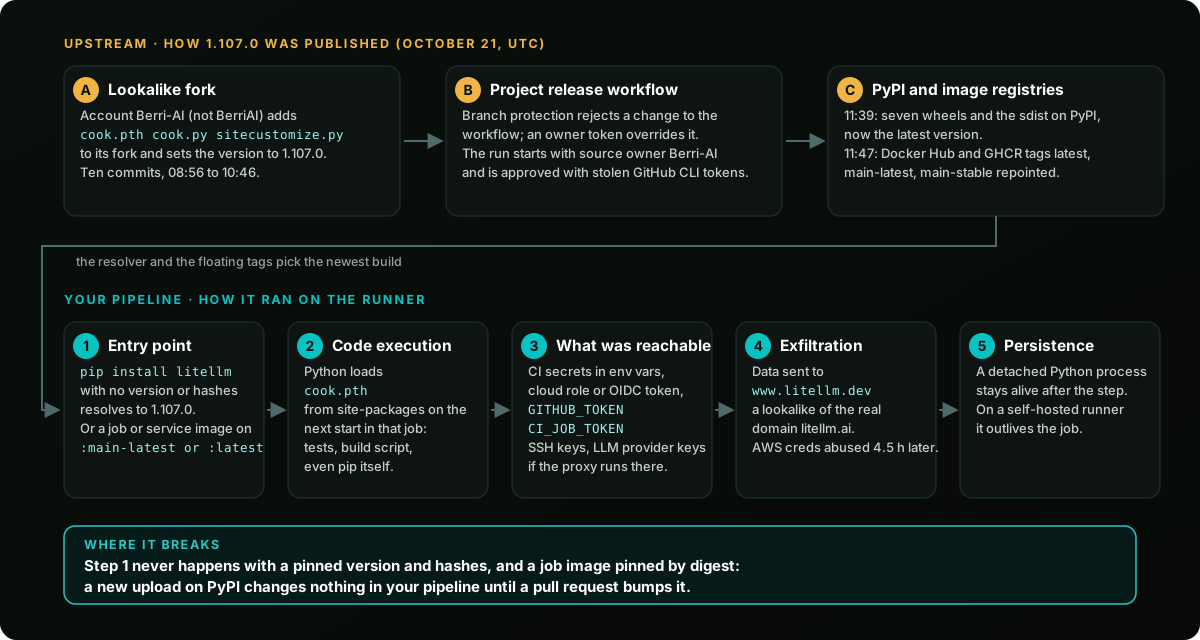
- October 21, 11:39 to 11:40 UTC: seven
1.107.0wheels and the sdist are uploaded to PyPI and become the latest version. - The wheels carry
cook.pth,cook.pyandsitecustomize.py. None of the three is in thev1.107.0git tag. - The GitHub user who reported them, crediting the Upwind research team, describes a credential stealer that runs on every Python start (issue #47826).
- Within ten minutes, the Docker Hub and GitHub Container Registry tags
1.107.0,v1.107.0,latest,main-latestandmain-stableall point at the same poisoned build.
The cleanup
- PyPI quarantines the release before 13:10 UTC. The latest version goes back to
1.106.2. - The maintainers remove the images by 14:32 UTC.
- Per Wiz, stolen AWS instance role credentials from CI runners and Kubernetes nodes are in use from 16:20 UTC, about 4.5 hours after the theft.
How it was published
The release came out of the project’s own pipeline.
- Per Socket, the provenance of the poisoned image names the project’s private release workflow, started with its source owner set to
Berri-AIinstead ofBerriAI, and built from that lookalike fork. - Per StepSecurity, only
v1.107.0was built from the fork.v1.106.2,v1.106.1andv1.107.0-rc.2record the real repository. - Per the litellm team (16:32 UTC), the run was started from one engineer’s GitHub account and approved from another’s, both apparently through stolen GitHub CLI OAuth tokens.
- Per the team’s incident post, branch protection first rejected the attacker’s change to the release workflow. A privileged credential overrode it five seconds later.
- In its 20:30 UTC update, the team said the tokens may have been exposed in the logs of an internal LiteLLM deployment reachable from the internet, and that a GitHub organization owner’s token was used to disable branch protections. How the attacker got into that deployment is not confirmed.
- Customers of the private enterprise release were not affected.
The Plumber take
Every week the same thing happens in a different registry. A trusted package ships a bad version, and the pipelines that install “whatever is newest” run it within minutes.
The fix is old and boring:
- pin versions,
- pin hashes,
- pin images by digest.
In our State of CI/CD Security 2026 research, 55% of projects still have unpinned or mutable dependencies.
The runner is the crown jewel. The PyPI wheel is just the delivery truck. What made 1.107.0 dangerous was where it landed: a CI job that holds the cloud role, the deploy key and the provider keys, for minutes on a hosted runner and much longer on a self-hosted one.
Pipelines are production code, on the publisher’s side too. Three things on the maintainer’s side did not hold:
- a release job that can be pointed at any repository is a publishing key for whoever types the name;
- a two-person rule does not help when the attacker holds both people’s tokens;
- branch protection that a privileged account can override is a speed bump. Here it rejected the change, and an override let it through five seconds later.
A tag is a name, not a promise. main-latest and main-stable sound safe, and main-stable even sounds conservative. All five tags pointed at the same new build within a minute.
If your CI cannot say which bytes it ran on October 21, you cannot answer the question your CEO will ask today: “were we exposed?”. That answer should take an hour, not a week.
Are you exposed?
The 60-second check
Three quick checks
1. Pinned to the bad version today (repo files, GitHub or GitLab):
P='(^|[^a-z0-9_.-])litellm(\[[^]]*\])? *===? *1\.107\.0([^0-9a-z.]|$)|litellm-1\.107\.0([- ]|\.tar\.gz|\.dist-info|$)|7598727f209d717041db|0aaf7ba346d41ef2f403|668169d35b87bf513240|462d0c9f67ca522d9e0e|c2e32d0ce2548aa662c1|1bbce8caa94f01c0aaa0|12d4ccc5c6f8d35cf4f2|2befe2a79fb4fbbd9a54'grep -rnE "$P" .It covers requirements files, uv.lock, poetry.lock and Pipfile.lock.
2. Installed during the window (October 21 from 11:39 UTC): search the logs of every CI job that installed Python packages that day for the same pattern (commands below). This is the check that matters for unpinned installs.
3. Your pipeline config: plumber analyze github.com/OWNER/REPO or your score. ISSUE-103 lists every job or service image that is not pinned by digest, including litellm/litellm:main-latest.
Detailed check
Two questions, in this order:
- Exposed today: do your files point at the bad version?
- Exposed during the window: did a job install it between October 21, 11:39 UTC and the removal? PyPI removed it by 13:23 UTC per the litellm team; the Docker Hub tags were cleaned at 14:20 UTC.
A hit in today’s files does not prove exposure during the window. A clean repo today proves nothing about that day.
Your files, GitHub or GitLab
P='(^|[^a-z0-9_.-])litellm(\[[^]]*\])? *===? *1\.107\.0([^0-9a-z.]|$)|litellm-1\.107\.0([- ]|\.tar\.gz|\.dist-info|$)|7598727f209d717041db|0aaf7ba346d41ef2f403|668169d35b87bf513240|462d0c9f67ca522d9e0e|c2e32d0ce2548aa662c1|1bbce8caa94f01c0aaa0|12d4ccc5c6f8d35cf4f2|2befe2a79fb4fbbd9a54'grep -rnE "$P" .grep -rnE '^[^#]*pip3? install[^#]*litellm' .github/workflows .gitlab-ci.yml Dockerfile* 2>/dev/nullgrep -rnE --include='*.txt' --include='*.in' --include='*.toml' '(^ *|")litellm(\[[^]]*\])? *($|[<>~!;#"])' .- The first command finds the bad version, or its file hashes, in any lockfile format.
- The second lists every install line that names
litellm. - The third lists every requirement on
litellmwithout==.
Any line without an exact version and hashes could have pulled 1.107.0 during the window.
GitHub Actions
List that day’s runs and search their logs:
gh run list --created '>=2026-10-21' --limit 200 --json databaseId,workflowName,createdAtgh run view <RUN_ID> --log | grep -E "$P"- A hit in a log is a yes, even if your files are clean today.
- Delete the Actions caches built on October 21:
gh cache list, thengh cache delete <id>. A dependency cache with an unchanged key can serve the bad version again.
GitLab CI
- Open the job logs of the pipelines that ran on October 21 and search for
litellm-1.107.0. A hit is a yes, even if your files are clean today. - Clear the runner caches built that day (“Clear runner caches” on the pipelines page).
- Purge
1.107.0from any internal mirror or proxy (Artifactory,Nexus,devpi).
Machines, runners and images
Self-hosted runners, dev laptops, servers, containers. Do not run pip or python before this check: the payload runs on every Python start.
find / -name cook.pth -o -name cook.py -o -name litellm-1.107.0.dist-info 2>/dev/nullFor containers, check every litellm image pulled on or after October 21, from Docker Hub or GitHub Container Registry, including the litellm-database and litellm-non_root variants:
D='sha256:(1bbcb1443bc9|c00f9d92c427|7b00e91cd2fe|bd1aeee419ea|56b74573eed6|24581ddc3076|827dd893c74c|645a67d81062|f75c8edae59b)'docker image ls --digests | grep -E "$D"kubectl get pods -A -o jsonpath='{range .items[*].status.containerStatuses[*]}{.imageID}{"\n"}{end}' | grep -E "$D"A hit means you pulled the compromised 1.107.0 image. Socket verified the payload in it, and the maintainers have removed it.
- Treat every container started from it like a machine that ran
1.107.0. - Replace it with the
v1.106.2image, pinned by digest. - Check your Kubernetes manifests, Helm values and compose files: any
litellmimage onlatest,main-latest,main-stableorv1.107.0restarted since then pulled it.
The fix that would have stopped it
GitHub Actions, before:
jobs: test: runs-on: ubuntu-latest services: proxy: image: litellm/litellm:main-latest steps: - uses: actions/checkout@v4 - run: pip install litellm pytestAfter:
jobs: test: runs-on: ubuntu-latest permissions: contents: read services: proxy: image: litellm/litellm@sha256:7294b90f868c5c38c99b83021c7ba46f9b439e95f8e32964c925c7d2563a03f7 # v1.106.2 steps: - uses: actions/checkout@v4 - run: pip install --require-hashes -r requirements.txt # litellm==1.106.2 with --hash linesGenerate the hashed file with pip-compile --generate-hashes, or use uv sync --locked with a committed uv.lock. Then a new upload on PyPI changes nothing in your pipeline until a pull request bumps it.
GitLab CI, same idea:
test: image: python:3.12.7 services: - name: litellm/litellm@sha256:7294b90f868c5c38c99b83021c7ba46f9b439e95f8e32964c925c7d2563a03f7 alias: proxy script: - pip install --require-hashes -r requirements.txtKey takeaways
litellm1.107.0on PyPI carried files that are not in its git tag. PyPI quarantined it on October 21.1.106.2is the version to use.- Keep an exact pin: the litellm team cannot yet rule out further access to the accounts behind the release, and ordinary releases are paused.
- A pipeline that ran an unpinned
pip install litellmon October 21 from 11:39 UTC should treat that job’s secrets as stolen. - Check your CI logs for that day, not only your repo. A clean lockfile today proves nothing about yesterday.
- If
1.107.0ran where it could reach an AWS instance role, check CloudTrail now: per Wiz, stolen role credentials were used about 4.5 hours after the theft. - The
latest,main-latestandmain-stableimage tags on Docker Hub and GitHub Container Registry pointed at the compromised build until the maintainers removed it. Pin images by digest. - If you publish packages, your release workflow should build only from your own repository. This one was started with a lookalike owner name.
- Do not run
piporpythonon a machine you suspect. Check forcook.pthfrom the shell first.
Next steps
- Install the Plumber app to analyze and fix your pipelines: github.com/apps/plumber-agent
- Scan your pipelines with the open source CLI: /docs/cli/github
- Star getplumber/plumber
- Sources: litellm issue #47826, SafeDep analysis, PyPI release page, Aikido intel, Socket, StepSecurity, JFrog, Wiz, litellm incident post
Keep reading


