
6 Practical Steps to Harden Your GitHub Project's Supply Chain
Attacks like hackerbot-claw have shown that CI/CD misconfigurations are actively exploited. That attack specifically targeted GitHub Actions workflows by abusing pull_request_target triggers and mutable action tags to gain write access and exfiltrate secrets. Not every project is vulnerable to that exact chain, but the underlying weaknesses (mutable references, overly permissive tokens, unsigned releases) are widespread and apply broadly.
The steps below won’t prevent every attack vector used in hackerbot-claw. For example, protecting against pull_request_target abuse requires workflow design decisions beyond what’s covered here. But they do address the foundational supply chain hygiene issues that make projects easier to compromise in the first place.
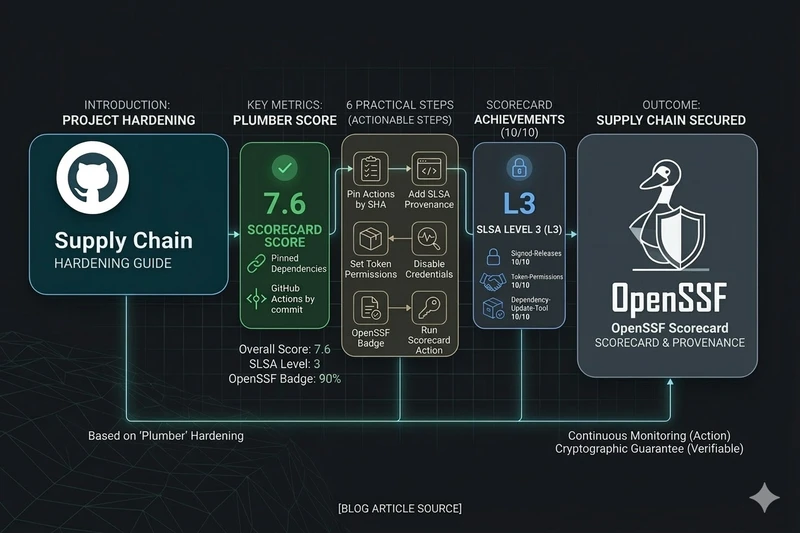
This post walks through six practical changes you can make today, with concrete examples. These are the same steps we applied to Plumber’s own supply chain, earning an OpenSSF Scorecard of 7.6, SLSA Level 3 provenance, and a 90% OpenSSF Best Practices badge.
1. Pin Your GitHub Actions by SHA
Impact: Pinned-Dependencies 10/10 on OpenSSF Scorecard
This is the single most impactful change. When you reference an action by tag (e.g., actions/checkout@v4), the tag owner can update what it points to at any time. A compromised or hijacked tag means malicious code runs in your workflow with your repository’s permissions.
Replace mutable tags with full commit SHAs:
# Before (mutable tag, vulnerable)- uses: actions/checkout@v4
# After (pinned by SHA, immutable)- uses: actions/checkout@11bd71901bbe5b1630ceea73d27597364c9af683 # v4.2.2
Keep the version in a comment for readability. Dependabot will automatically open PRs to update the SHAs when new versions are released. Enable it by adding this to .github/dependabot.yml:
version: 2updates: - package-ecosystem: "github-actions" directory: "/" schedule: interval: "weekly"2. Add SLSA Provenance to Your Releases
Impact: Signed-Releases 10/10 on OpenSSF Scorecard
SLSA (Supply-chain Levels for Software Artifacts) provenance gives your users a cryptographic guarantee that your release binaries were built from the expected source code, on a trusted build platform, without tampering.
What SLSA provenance protects against
SLSA doesn’t prevent all supply chain attacks. It specifically addresses post-build tampering: someone replacing a binary on the release page, a compromised CI pipeline producing different output than expected, or a maintainer account being hijacked to publish a poisoned release.
It does not protect against vulnerabilities in the source code itself, compromised dependencies pulled during build, or attacks that happen before the build step. Think of it as a seal on the package: it proves the package came from the expected factory, not that the factory’s ingredients were safe.
Setting it up
GitHub provides a first-party action for generating build provenance attestations: actions/attest-build-provenance. It signs your artifacts via Sigstore using the GitHub Actions OIDC identity and stores the attestations in GitHub’s attestation store, making them visible in the GitHub web UI and verifiable with the gh CLI.
Add it to your release workflow after building your artifacts:
release:  permissions:    contents: write    id-token: write    attestations: write  steps:    - name: Build      run: # ... your build steps ...
    - name: Attest build provenance      uses: actions/attest-build-provenance@a2bbfa25375fe432b6a289bc6b6cd05ecd0c4c32 # v4.1.0      with:        subject-path: dist/your-binary-*
The subject-path accepts globs, so a single step can attest all your release binaries. The attestations are stored natively in GitHub. No separate provenance file needs to be uploaded to the release.
When and how to verify
Verification matters most in these scenarios:
- Before deploying to production: if you download a binary from a GitHub release and deploy it to servers, verify it first. This catches tampering between the build and your deployment.
- In automated pipelines: add a verification step in your deployment pipeline so it fails if the attestation doesn’t match.
- After security incidents: if you suspect a compromise, re-verify previously deployed binaries against their attestations to confirm they’re genuine.
Users verify with the GitHub CLI, no extra tools needed:
# Download the binarygh release download v1.0.0 --repo your-org/your-project \  --pattern 'your-binary-linux-amd64'
# Verify its provenancegh attestation verify your-binary-linux-amd64 --repo your-org/your-project
On success, this confirms the binary was built from the expected commit, on GitHub’s infrastructure, and wasn’t modified after the build.
You can also browse attestations in the GitHub web UI: go to your repository, click Actions, then click Attestations in the left sidebar under “Management”.
For container images, attestation verification can also be enforced at the cluster level. For example, Kyverno can reject pods whose images lack a valid attestation:
apiVersion: kyverno.io/v1kind: ClusterPolicymetadata: name: require-provenancespec: validationFailureAction: Enforce rules: - name: check-attestation match: any: - resources: kinds: ["Pod"] verifyImages: - imageReferences: ["ghcr.io/your-org/*"] attestations: - type: https://slsa.dev/provenance/v1 attestors: - entries: - keyless: issuer: https://token.actions.githubusercontent.com subject: https://github.com/your-org/your-repo/.github/workflows/*This shifts verification from a manual step to a guardrail: workloads that don’t have valid provenance simply can’t run.
For a complete working example, see Plumber’s release workflow.
3. Set Least-Privilege Permissions
Impact: Token-Permissions 10/10 on OpenSSF Scorecard
By default, GitHub Actions workflows get a GITHUB_TOKEN with broad permissions. A deny-all default at the workflow level, combined with job-level overrides, ensures each job only gets what it needs.
# Deny all permissions at workflow levelpermissions: {}
jobs:  test:    permissions:      contents: read    # Only needs to read code    runs-on: ubuntu-latest    steps:      - uses: actions/checkout@11bd71901bbe5b1630ceea73d27597364c9af683
  release:    permissions:      contents: write   # Needs to create releases      id-token: write   # Needs OIDC for SLSA provenance    runs-on: ubuntu-latest    steps:      - uses: actions/checkout@11bd71901bbe5b1630ceea73d27597364c9af683
This limits the blast radius if any step is compromised. An attacker who gains code execution in the test job can only read code, not push changes or create releases.
4. Disable Persisted Credentials on Checkout
Impact: Reduces token exposure across all workflow steps
By default, actions/checkout stores the GITHUB_TOKEN in the local git config so subsequent git commands can authenticate. If you don’t need git push in later steps, disable this:
- uses: actions/checkout@11bd71901bbe5b1630ceea73d27597364c9af683 with: persist-credentials: falseThis is especially important in workflows that run third-party tools, scripts, or build systems that could read the stored credentials.
5. Register for the OpenSSF Best Practices Badge
Impact: CII-Best-Practices check on OpenSSF Scorecard
The OpenSSF Best Practices program evaluates your project against a comprehensive checklist covering documentation, change control, reporting, quality, security, and analysis. Even partially completing it surfaces areas you may have overlooked.
To get started:
- Go to bestpractices.dev and sign in with GitHub
- Add your project and start filling in the criteria
- Add the badge to your README:
[](https://www.bestpractices.dev/projects/YOUR_ID)Common quick wins that improve your score:
- Add a
SECURITY.mdwith vulnerability reporting instructions (Security-Policy 10/10) - Add a
CONTRIBUTING.mdwith contribution guidelines - Set up issue templates for bug reports
- Enable GitHub Security Advisories for private vulnerability reporting
6. Run the OpenSSF Scorecard Action
Impact: Continuous automated security posture monitoring
The Scorecard GitHub Action runs the same checks that produce your public score, right in your repository. Set it up to run weekly and on pushes to main:
name: OpenSSF Scorecardon:  push:    branches: [main]  schedule:    - cron: '0 6 * * 1'  # Weekly on Monday
permissions: {}
jobs:  scorecard:    permissions:      security-events: write  # Upload SARIF      id-token: write         # Publish results    runs-on: ubuntu-latest    steps:      - uses: actions/checkout@11bd71901bbe5b1630ceea73d27597364c9af683        with:          persist-credentials: false
      - uses: ossf/scorecard-action@05b42c624433fc40578a4040d5cf5e36ddca94b1 # v2.4.3        with:          results_file: results.sarif          results_format: sarif          publish_results: true
      - uses: github/codeql-action/upload-sarif@48ab28a6f5dbc2a99bf1e0131198dd8f1df78169        with:          sarif_file: results.sarif
Results appear in your repository’s Security tab as code scanning alerts, making it easy to track improvements over time. The public score is also visible at securityscorecards.dev/viewer/?uri=github.com/your-org/your-project.
Putting It All Together
Here’s a summary of what each change improves on the OpenSSF Scorecard:
| Change | Scorecard Check | Expected Score |
|---|---|---|
| Pin actions by SHA | Pinned-Dependencies | 10/10 |
| SLSA provenance | Signed-Releases | 10/10 |
| Least-privilege permissions | Token-Permissions | 10/10 |
| SECURITY.md | Security-Policy | 10/10 |
| Dependabot | Dependency-Update-Tool | 10/10 |
| Scorecard action | (enables monitoring) | - |
| Best Practices badge | CII-Best-Practices | 10/10 |
Most of these changes take minutes to implement individually, and the compound effect is significant. For a real-world example of all of them applied together, see Plumber’s PR #96.