Security
A green pipeline, a moved tag, and 6 weeks of stolen secrets
My customer's GitHub Actions pipeline passed every run for six weeks while a compromised third-party action shipped their source code and secrets to an attacker's server. Here is the true story behind Plumber, how a moved tag turned a trusted action into an exfiltration tool, and how to find the same attack path in your own pipeline in 30 seconds.
By Thomas Boni
For six weeks, my customer’s pipeline was green. Every run passed, every deploy went out, everyone was happy. The whole time, it was sending the company’s source code and secrets to an attacker’s server.
This is the story of how I found it, why nobody else did, and why it is the reason Plumber exists.
A perfect pipeline
I was working with a customer on their CI/CD. Their GitHub Actions pipeline looked like the one everybody wants: build, test, scan, deploy. It had been written by an AI agent. It had run hundreds of times. It had never failed.
Nobody had a reason to look inside. When a pipeline is green, it disappears from everyone’s attention. Be honest: when did you last actually read yours? A month ago? A year ago? Never?
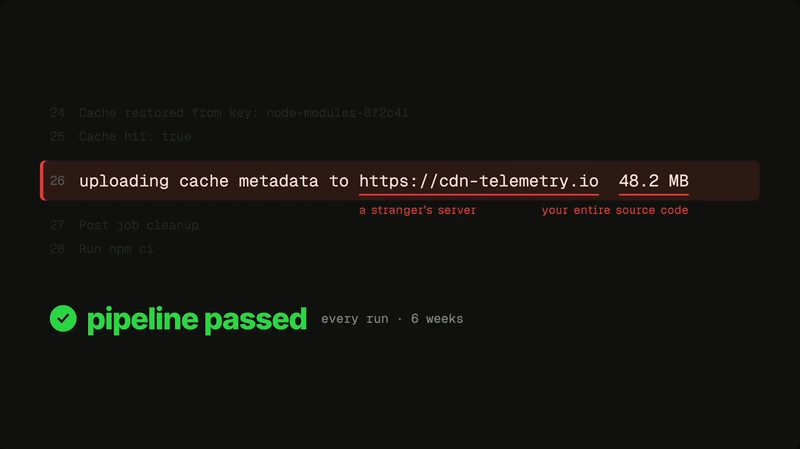
One day I decided to look closer at the logs, and I found a line that did not belong. It looked roughly like this (names changed, the real one was just as boring):
24 Cache restored from key: node-modules-8f2c4125 Cache hit: true26 uploading cache metadata to https://cdn-telemetry.io 48.2 MB27 Post job cleanup.A cache step that uploads 48 MB of “metadata” to a domain nobody on the team had ever heard of. That was not metadata. That was the repository, plus every secret the job could read.
What actually happened
The workflow used a third-party GitHub Action, referenced by tag, like most workflows do:
steps: - uses: actions/checkout@v4 - uses: acme-ci/setup-cache@v2 # third-party, pinned to a tag - run: npm ci && npm testOne day, that action was compromised. The attacker did not need a pull request, a release, or any access to my customer’s repository. They only had to move the v2 tag to a new commit containing their own code.
A Git tag is just a pointer, and it can be moved. Same name, new code, no release notes, no notification. On the next run, my customer’s pipeline pulled the new code and executed it with everything the job had access to:
- the full source code, checked out a few steps earlier;
- the secrets exposed to the job (
GITHUB_TOKEN, cloud keys, registry tokens); - whatever permissions the token had: push, publish, deploy.
Then it did what the pipeline was built to do: it passed. Exit code 0. Green check. For six weeks.
Green means 'it worked', not 'it was safe'
A CI status only tells you whether your commands returned successfully. It says nothing about what else ran, where data went, or who received it.
A well-written attack is designed to keep your pipeline green.
Why nobody saw it
We put real effort into securing our applications: SAST on the code, code review on every change, Dependabot and SCA on the dependencies. Then we hand the keys to the pipeline and never look at it again.
That is backwards. The pipeline is the most privileged part of your software supply chain. It is the one place that holds your source code, your secrets, and your production access at the same time.
Your
deploy.ymlhas more access than your CTO, and gets less review than a typo fix.
And it is getting worse. More and more workflows are written by AI agents: they work, they pass, and nobody reads them. My customer’s pipeline was not badly written. It was written like millions of others.
This is not a one-off
The mechanism is not theoretical. In March 2025, the popular tj-actions/changed-files action was compromised the same way: the attacker rewrote its version tags to point to a malicious commit. More than 23,000 repositories ran it, dumping their CI secrets into workflow logs. We covered it in detail in our tj-actions analysis, and the pattern keeps coming back, as with Shai-Hulud.
Every workflow that says uses: something@v2 is trusting whoever controls that tag today, not the code someone reviewed when the line was written.
Finding the same attack path in 30 seconds
This is why we built Plumber: an open-source CLI that reads your CI/CD workflows and all their dependencies, and shows you every attack path. The ones exploited today, and the ones waiting for tomorrow’s compromise.
To show it, we rebuilt my customer’s situation in a public demo repository, with the same structure and the same tag-pinned third-party action, and ran one command:
brew tap getplumber/plumber && brew install plumbercd payments-apiplumber analyzeThe first finding is exactly the path the attacker used:
 HIGH  Attack path 1       Entry  getplumber-examples/setup-cache@v2 (untrusted and mutable external action)       │       └──▶ runs in job `deploy` from workflow `deploy.yml`            └─▶ reaches a token with push and publish access
       So     if this action is compromised or malicious, an attacker can read              3 secrets of the repository, push in your repository, publish              packages and deploy       Fix    use an action from a trusted source and pin the version on the commit SHA       ↳ details: run `plumber explain -a 1`
One command, and you know what an attacker can reach from your pipeline, and which single fix closes the biggest hole.
What you can do today
Run Plumber on your main repositories
Terminal window plumber analyzeStart with the repositories that deploy to production or publish packages.
Pin third-party actions by commit SHA
- uses: acme-ci/setup-cache@3f1c2a9e8b7d6c5f4e3d2c1b0a9f8e7d6c5b4a3f # v2.4.1A SHA cannot be moved. Plumber flags every unpinned third-party action (ISSUE-701).
Give the
GITHUB_TOKENthe minimum permissionsSet
permissions:explicitly at the workflow or job level. A compromised step can only abuse what the token is allowed to do.Keep secrets away from steps that do not need them
Pass secrets only to the step that uses them, not to the whole job, so a third-party step cannot read them.
Read your pipeline, or have something read it for you
Add Plumber to your CI so every new workflow, including the ones written by an agent, is checked before it merges.
Key takeaways
- A green pipeline is not a secure pipeline: a good attack keeps your CI passing.
- The pipeline holds your source code, secrets and production access at once, and it is the part of the stack we review the least.
- A third-party action pinned to a tag runs whatever the tag points to today. Pin by commit SHA.
- Agent-written workflows work fine and nobody reads them. Someone, or something, has to.
- You can map every attack path in your pipeline with one open-source command, in about 30 seconds.
Next steps
- Run Plumber locally: one command, a full report of your pipeline’s attack paths in 30 seconds.
- Check continuously with Plumber in your pipeline: add the Plumber GitHub Action so every change to your workflows is analyzed before it merges.
Keep reading