Security
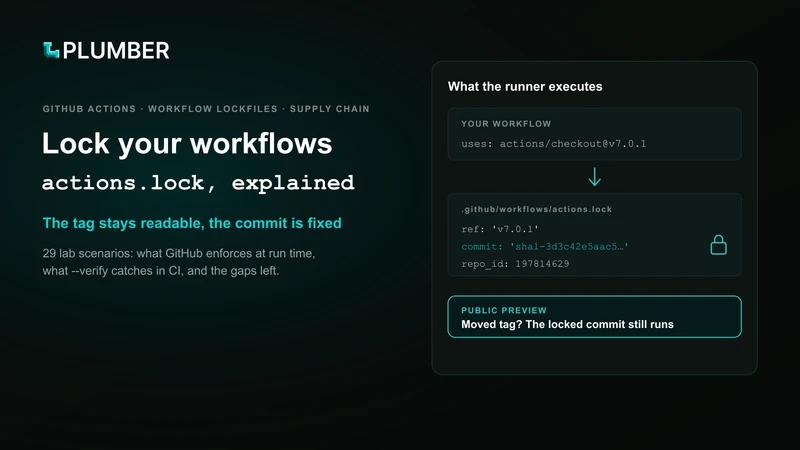
Lock your workflows: GitHub Actions dependency lockfiles, explained
Workflow lockfiles make GitHub Actions run the commit recorded in your repository instead of whatever a tag points to today. We tested 29 scenarios to see what GitHub enforces at run time, what gh actions-lock --verify catches in CI, and the gaps that remain.
By Plumber, Thibault Condemine
Public preview
github/gh-actions-lock is pre-1.0 and its flags, behaviour and lockfile format still change between releases, and GitHub labels workflow lockfiles “subject to change”. We ran our tests with v0.3.0 on 23 October 2026. We update the Plumber CLI as each release lands.
A tag in a workflow is a pointer that anyone with write access can move. Workflow lockfiles, in public preview since 14 October 2026, make the runner execute the commit recorded in your repository instead. They also check the source repository’s id, and refuse to start if any dependency is missing, including the ones your actions call.
Ask your teams for three things:
- Onboard workflows, release and deploy pipelines first.
- Run
gh actions-lock --verifyin CI. It catches a lockfile pointing a tag at older code, which GitHub lets run. - Turn on Require lockfile. Without it, nothing forces a workflow to use the lockfile.
The problem with tags, and with SHA pinning
Tags move. In March 2025 an attacker repointed the tags of tj-actions/changed-files (CVE-2025-30066) to a commit that leaked CI secrets into build logs. Every workflow on a tag ran it on its next run.
Pinning to a full commit SHA stops that, at three costs:
- Unreadable. Teams add a
# v3.29.5comment that nothing checks. - Hard to maintain. Every bump is a new SHA to look up, so pins go stale.
- Shallow. A pin freezes your action, not the
uses: helper@maininside it.
A lockfile keeps readable tags in the workflow and moves the immutability, including that last gap, into one generated file.
What a workflow lockfile is
A lockfile is one generated YAML file per repository, .github/workflows/actions.lock, that records the exact commit behind every action reference. Your workflow keeps its readable tags. In the first scenario of our test bed (PR #1), the workflow runs two actions:
steps: - uses: actions/checkout@v7.0.1 with: persist-credentials: false - uses: Exypte/lock-file-action@v3.0.0 # a composite actiongh actions-lock produced this lockfile (trimmed to ci.yml, comments added):
version: 'v0.0.3'workflows: # onboarded workflows, and what each uses '.github/workflows/ci.yml': - 'actions/checkout@v7.0.1' - 'exypte/lock-file-action@v3.0.0'dependencies: 'actions/checkout@v7.0.1': ref: 'v7.0.1' # what the workflow says commit: 'sha1-3d3c42e5aac5ba805825da76410c181273ba90b1' # what runs owner_id: 44036562 repo_id: 197814629 # the identity GitHub checks 'exypte/lock-file-action@v3.0.0': ref: 'v3.0.0' commit: 'sha1-6133a07d2663d9bfa11411a3fb969b4a711d6363' owner_id: 38421281 repo_id: 1428395650 uses: # what this composite calls - 'super-linter/super-linter@v6.5.0' 'super-linter/super-linter@v6.5.0': # transitive, locked too ref: 'v6.5.0' commit: 'sha1-56576d491db07c7236b445ab09991ca49d12b0c6' owner_id: 74564708 repo_id: 216581567super-linter never appears in our workflow, yet it is locked: a SHA pin in ci.yml could not have reached it. It also carries a known CVE, and the lockfile locked it as is.
What the runner does with it, for each onboarded workflow:
- Runs the locked commit, even if the tag or branch has moved since. The choice is made at Set up job, before any step runs. In lab 18 we advanced a nested
@movingbranch upstream, and the re-run still printed the old version. - Checks repository identity through
repo_id, so a replaced repository fails at Set up job (lab 15).owner_idis not enforced (lab 16), which keeps renames and transfers working. - Requires completeness: a workflow or dependency missing from the lockfile stops the run before it starts. That includes transitive entries (lab 17) and shell-only workflows, which need an empty
[]entry (labs 06-07). A malformed lockfile counts as a missing one (lab 03).
Onboarding is per workflow: a workflow is onboarded when it has a key under workflows:. One action can appear at several versions when a dependency brings its own copy (lab 02), so review each entry on its own.
Adopting it, step by step
These steps follow GitHub’s how-to and the gh-actions-lock README.
Install the extension. It needs an authenticated
gh. Pin the version, since the tool is pre-1.0:Terminal window gh extension install github/gh-actions-lock --pin v0.3.0Generate the lockfile from the repository root, for every workflow or for one at a time:
Terminal window gh actions-lockgh actions-lock .github/workflows/release.ymlReview the whole diff. Partial refs are rewritten to the exact version locked (
@v3becomes@v3.1.0), and local./actions to$/: treat both as behaviour changes. Allowed-actions entries pinned to a tag stop matching, so use a wildcard or the full SHA there.Check it in CI.
gh actions-lock --verifyruns the same checks without writing anything. It catches what GitHub lets run (next section).--verify-localis the offline variant for a pre-commit hook.Keep it current. Re-run
gh actions-lockwhenever you add a workflow or change auses:line. A re-run keeps existing pins;gh actions-lock --relockadvances refs that moved for a legitimate reason, and should be run once after upgrading the extension.Keep the old lock
Never edit the file by hand, and never delete and regenerate it to silence
--verify: the old lock is your evidence of what changed upstream.Enforce it.
Require lockfile
The Require lockfile policy blocks runs of targeted workflows that are not onboarded, at enterprise, organization or repository level. The CI check reports problems and the policy blocks the run.
Optional: turn on Dependabot for GitHub Actions. When it bumps an action in an onboarded workflow, it regenerates the matching lockfile entry in the same pull request. It does not onboard new workflows.
A minimal CI check:
- name: Verify the workflow lockfile env: GH_TOKEN: ${{ github.token }} run: | gh extension install github/gh-actions-lock --pin v0.3.0 gh actions-lock --verifyWhat GitHub and --verify each catch
GitHub’s runtime and gh actions-lock --verify each catch things the other misses, so you need both. We built lock-file-consumer, a public test bed of 29 lab scenarios, each a pull request run against both checks (lockfiles generated with v0.2.0, --verify with v0.3.0, runs of 23 October 2026).
| Scenario | GitHub at run time | --verify in CI (v0.3.0) |
|---|---|---|
Exact tag v3.0.0 locked to an older commit (lab 10) | Runs the old code as v3.0.0 | Fails: locked commit isn’t the tag’s commit |
| Exact tag force-moved upstream (lab 20) | Keeps the old commit, never reports the move | Fails: locked commit isn’t the tag’s commit |
Local ./ action with a stale lockfile (lab 23) | Runs | Fails on the stale entry; the ./ action itself is only a warning |
| Reusable workflow whose tag ships no lockfile (lab 28) | Blocked: missing a lockfile | Passes |
| Transitive entry removed (lab 17) | Blocked: invalid lockfile | Fails: incomplete lockfile (passed in v0.2.0) |
| Hand-written entry for a fork-only imposter commit (lab 25) | Blocked: version not found | Fails: not in upstream history (only warned in v0.2.0) |
| Workflow or dependency not covered (labs 04-06) | Blocked | Fails |
uses: changed without relocking (lab 08) | Blocked | Fails |
| Commit outside its claimed tag (lab 13) | Fails at Set up job | Fails |
Repository replaced, repo_id changed (lab 15) | Fails at Set up job | Fails |
| Upstream branch deleted (lab 19) | Fails on re-run | Fails |
@main locked back to an older commit in its history (lab 11) | Runs the older code | Passes |
owner_id tampered (lab 16) | Runs | Passes |
What the table shows:
- A pull request that touches only the lockfile can downgrade an action, and only
--verifysees it for exact tags. At run time GitHub only checks that the locked commit belongs to the ref’s history, not that it is the commit the tag points to today. A pull request that mapsv3.0.0to an older commit of that history changes no workflow file, only a generated file reviewers tend to skip, and the run then executes the old code under thev3.0.0name (lab 10).--verifyresolves the tag upstream, sees the two commits differ, and fails. - Neither check sees it for floating refs. Any commit in the history of
mainorv4is a legitimate lock for them, so a rollback passes both checks (lab 11). Prefer exact tags and read lockfile diffs. - GitHub fails in two places. Coverage and parse problems stop the run before it starts. Identity and history checks fail later, in Set up job.
v0.3.0 catches two cases that only GitHub caught under v0.2.0 (labs 17 and 25), which leaves the reusable-workflow case as the one gap where only GitHub catches the problem. It also records edges the v0.2.0 lockfiles missed, so a lockfile written by v0.2.0 can fail v0.3.0’s --verify while GitHub still accepts it. Run gh actions-lock --relock once after upgrading (labs 01 and 09).
Pull requests that change workflows or the lockfile
A lockfile in the repository does not force anyone to use it: the Require lockfile policy does. We ran the changes a contributor could propose as pull requests from branches of our test bed:
| Change proposed in the pull request | GitHub result |
|---|---|
| Delete the lockfile (PR #3) | Blocked: “Workflow must use a lockfile” |
| Malformed lockfile YAML (lab 03) | Blocked at startup, reported as a missing lockfile |
| Workflow removed from coverage (lab 04) | Blocked: “missing a lockfile” |
| New workflow added without relocking (lab 05) | That workflow blocked, the others run |
| Action reference changed without a matching pin (lab 08) | Blocked: “Invalid lockfile” |
| Reference changed with a matching pin (lab 09) | Runs locked |
We did not test these situations:
- Pull requests opened from forks.
- The same runs with and without the Require lockfile policy.
pull_request_target. GitHub’s workflow execution protections, generally available since 17 September 2026, disable this event by default on public repositories that have no event policy, and enforce the rule automatically from 2 December 2026.
A pull request’s run: commands execute whether or not the workflow is locked.
Limits today
The lockfile is a public preview, and it locks whatever the ref points to when you lock it. GitHub’s changelog says locking does not determine whether a dependency is safe. These are the gaps today:
| Gap | What it means for you |
|---|---|
| Preview format | The format and flags still change between releases. Pin the extension version, and relock once after each upgrade (labs 01 and 09). |
| Availability | GitHub.com on Free, Team and Enterprise Cloud, including data residency. Not GitHub Enterprise Server. |
| Reusable workflows | The caller locks only the call. The called workflow’s tag must ship its own actions.lock, or the run is blocked (lab 28), and --verify does not check this. Onboard shared workflow repositories first, then tag them. |
| Local actions | ./path actions are not followed. Onboarding rewrites them to $/path, which always resolves in the repository that defines it, not in the caller’s checkout (labs 21-22). That is a behaviour change if your workflow generates actions before using them. |
| Container images | Not locked, and unpinned images still run. Since v0.3.0 the CLI warns about both docker:// steps and job-level container: images, but only as a warning (lab 26), and a locked Docker action’s tagged runs.image still moves. Pin images by @sha256: digest. |
| Runtime downloads | A locked action can still curl | bash, fetch a release binary, or install npm or pip packages. Those need their own lockfiles and checksums. |
| Floating refs | main or v4 accept any commit in their history, so a rollback passes everything (lab 11). Prefer exact tags. |
| Trust at lock time | A tag already compromised when you lock it gets locked as is. It does not fix shell injection, broad token permissions or a compromised runner either. Vulnerability and source checks still matter. |
How Plumber reads lockfiles
Plumber, our open-source CLI, supports workflow lockfiles since v0.7.11. When a repository commits .github/workflows/actions.lock, the pinning control ISSUE-701 accepts the step references it pins, so teams that use a lockfile get no false positive for keeping readable tags.
Two cases are still reported, because the lockfile does not cover them:
- a reusable workflow called on a mutable ref, which still needs a commit SHA;
- steps that come from another repository’s reusable workflow, which that repository’s own lockfile governs.
For now the CLI reads only the lockfile’s presence and leaves coverage to GitHub’s enforcement. We will work with what the lockfile contains (locked commits, transitive entries, staleness) once the format reaches a stable release.
Run plumber analyze on your repository to see which references are mutable, which are locked, and which the lockfile cannot cover yet.
Sources
Our tests
- Exypte/lock-file-consumer: our 29 lab scenarios (
--verifywith v0.3.0, runs of 23 October 2026)
GitHub
- Changelog: workflow lockfiles in public preview (14 October 2026)
- Changelog: workflow execution protections generally available (17 September 2026)
- Docs: Workflow dependency lockfiles
- Docs: Lock workflow dependencies
- Docs: Enforce workflow lockfiles
- github/gh-actions-lock: the CLI extension
Plumber
- Plumber CLI v0.7.11 release notes (21 October 2026)
- ISSUE-701: actions must be pinned
Incident
- CVE-2025-30066: the
tj-actions/changed-filestag compromise (March 2025)
Keep reading